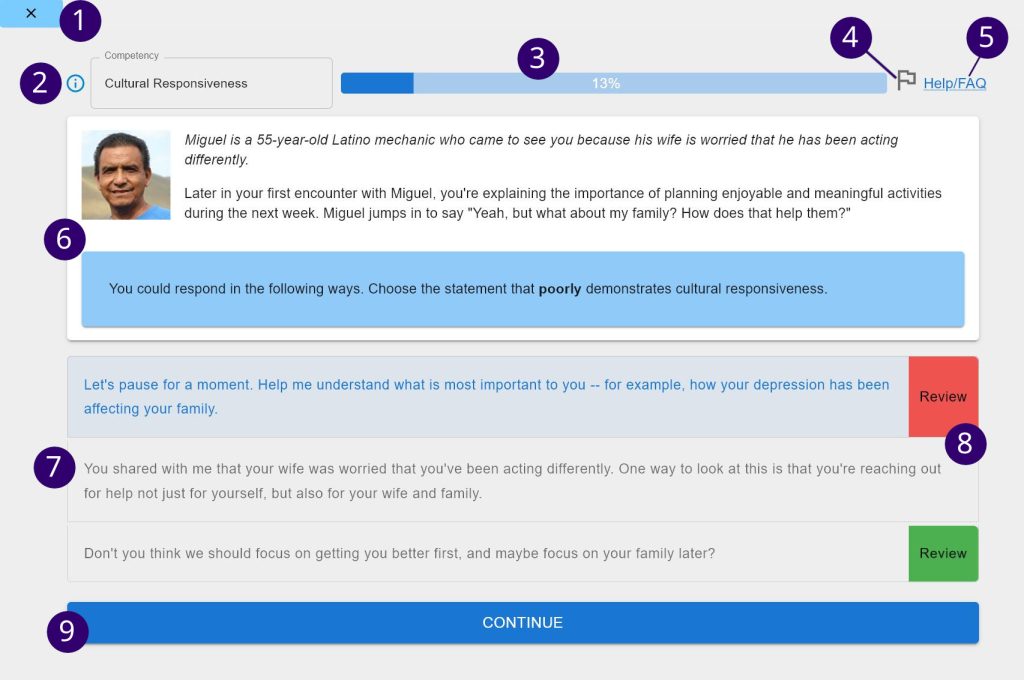
- Close: Close Current Module (only for non-Canvas/standalone version)
- Module Info: Get description of current module
- Progress Bar: Percentage progress until module completion
- Report Bug/Issue: Click to report issues like technical bugs, typos, or confusion with the question content.
- Help: Click to review the student help and FAQ page
- Question Area: Typically will have a scenario and question based on that scenario
- Answer Input Area: Typically will have multiple choice options that you must select from. Some questions require typing in a response.
- Review: If you submit an incorrect response, click the ‘Review’ button to get more detailed feedback on why a selected response was incorrect and/or why an unselected response should have been selected
- Submit: Click to submit an answer and continue to the next question
Watch the following video for an overview of the user experience of ITS